Send the shorter plan to the client on Friday.
From #client-updates · Account owner’s message
A shared workspace for conversations and follow-through
Bring team conversations, decisions, tasks and goals into one workspace, so the next step stays connected to the discussion behind it.
Available for guided evaluation. Some AI and advanced workspace screens use sample behaviour; external AI providers need configuration. A demo is not proof of production readiness.
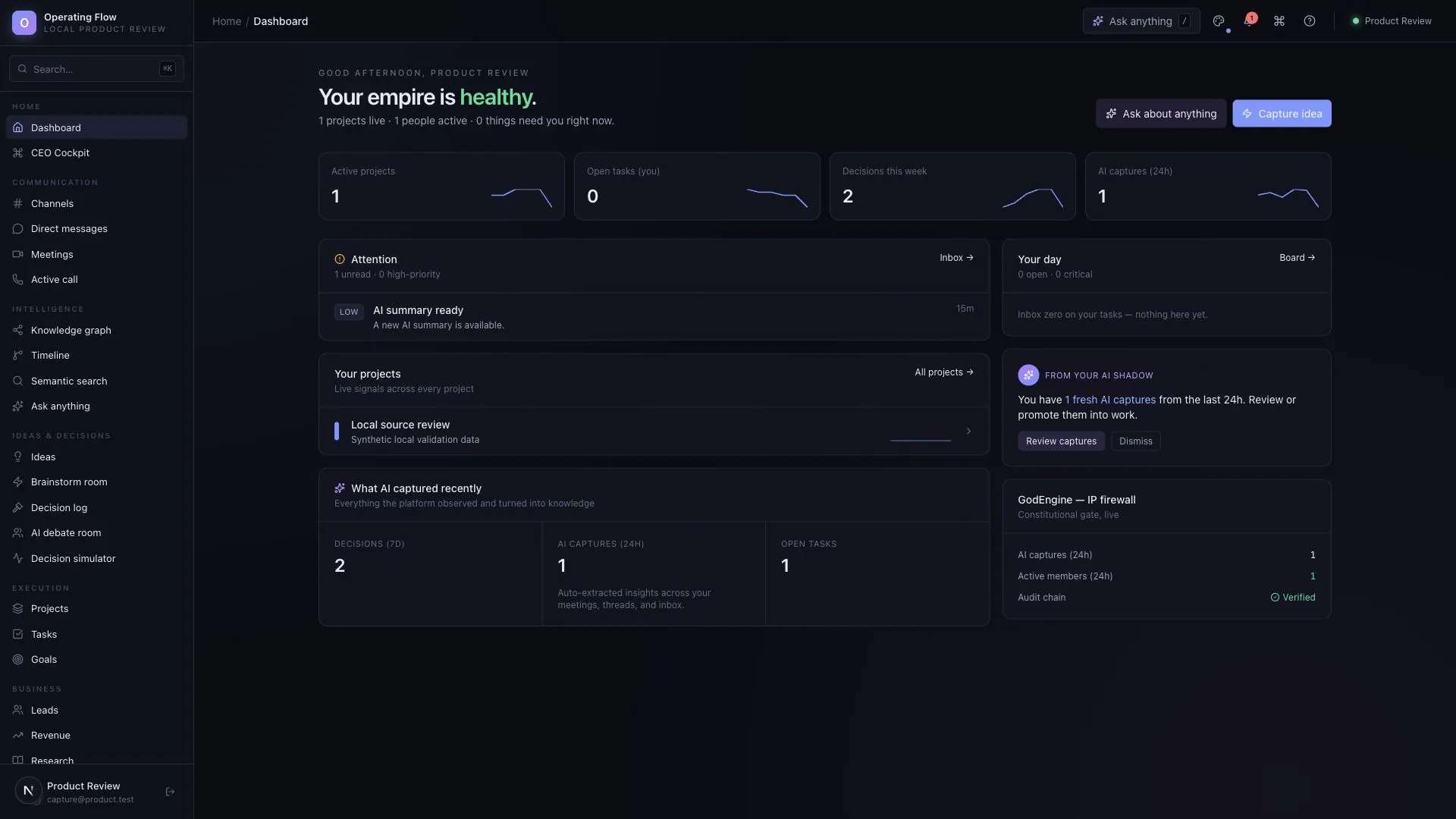

Watch the work move
A short recording of the actual interface. Open the walkthrough player for the 20-second tour, screen by screen.
Sound familiar?
A client update sits in a chat. The action sits in a task list. The reason behind it stays in someone’s head. Finding the full picture takes another round of messages.
Keep the conversation, the decision and the follow-up within the same working environment.

What makes the approach worth exploring
A task tells you what to do. A conversation explains how the team got there.
UniFlow brings those working records into the same environment: channels, reviewed decisions, ideas, tasks and goals. Evaluate whether that connection makes your own handovers easier to follow.
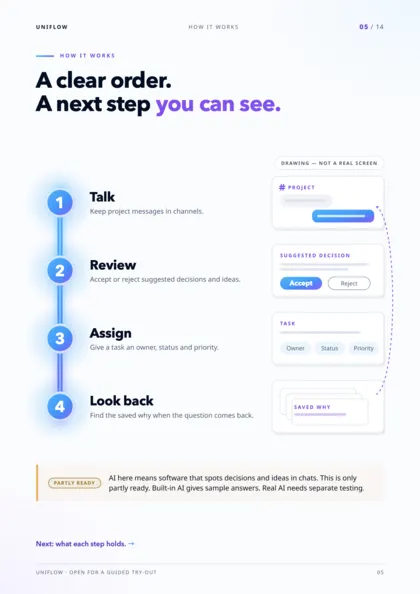
Start with one project. Keep the discussion. Review the agreement. Give the next step an owner.
What you can explore
Each capability below exists in the reviewed product. The labels show exactly what you will be looking at.
Organise messages in channels and keep a shared history for the team.
ImplementedChannels and stored messagesAccept or reject proposed decisions instead of treating every suggestion as an agreement.
ImplementedDecision reviewKeep an idea visible, then move it into a task when the team is ready.
ImplementedIdeas and task promotionSet a task owner, status and priority so a discussion can lead to action.
ImplementedTask managementMaintain objectives and milestones without losing sight of the larger outcome.
ImplementedGoals and milestonesRecord leads and update their stage in the same workspace.
ImplementedLead recordsAlso in the product: presence and live events, an in-app notification inbox and a cockpit of event metrics. Meeting records, connected search and advanced AI screens are partial or use sample behaviour — see the full availability list.
How the journey works
Four steps, sample data, nothing to sign up for. Accept or reject a proposal, give the work an owner, then follow it back to the conversation.
Client asked for a shorter version of the plan before Friday.
I can cut it to two pages if we drop the appendix.
Agreed — send the shorter plan and keep the appendix for the review call.
We rebuild this summary every month. Should we make a template?
The discussion is saved in the channel. Now ask for proposed records.
Proposed by sample AI Nothing is agreed until a person reviews it.
From #client-updates · Account owner’s message
From #client-updates · Designer’s message
Review the decision to continue.
Create the task, then move it along.
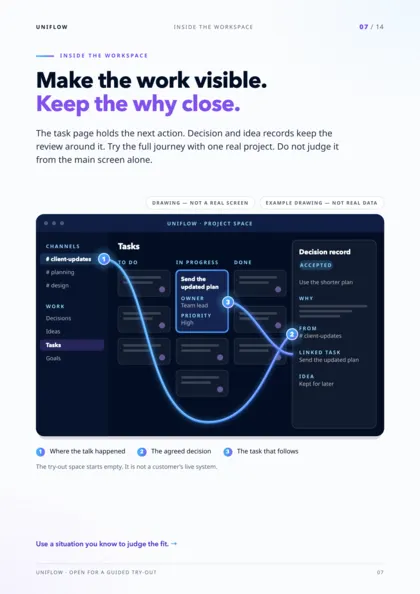
A teammate who missed the discussion opens the task. Follow its links back.
That is the context behind the task — without another round of “what did we agree?”. In the evaluation, test connected search and AI answers with a configured provider before relying on them.
Create a channel for a project or shared topic. Keep the messages and discussion history together.
The conversation-processing path can propose structured insights. In the current evaluation, this uses a sample AI provider unless a real provider is configured. Review proposed decisions and ideas before acting.
Create or update tasks, choose an owner and priority, and track progress alongside project goals.
Return to earlier messages and reviewed records. Evaluate connected search with your own examples before depending on AI answers.
Find your situation
For business owners
When several projects are moving at once, the hard part is often remembering what was agreed and what still needs an owner.
Use channels for working context, reviewed decisions for agreements, and tasks for follow-through.

For project leads
A new owner should not need five different people to explain the last decision.
Keep the project discussion and its follow-up records accessible in one workspace.

For growing teams
Good suggestions disappear when the chat moves on.
Review ideas, turn the useful ones into tasks, and keep goals visible as work develops.

A closer look, without the sales theatre
The core conversation-to-work path was exercised locally, including message storage, extraction-shaped results, reviewed records, relationships and notifications. That run used sample AI, not a live external model.
Availability: Available for guided evaluation. Some AI and advanced workspace screens use sample behaviour; external AI providers need configuration. A demo is not proof of production readiness. Check what works today.
Compare the workflow
A fair look at broad approaches — not named products. The difference is in how the pieces connect.
Existing tools may already fit your process. Evaluate the connected workflow and its actual availability before deciding to switch.
Brochure · Digital edition · October 2026
Fourteen pages, one job each: the problem, the four-stage workflow, the actual interface, fair comparisons, the system picture and the evidence boundary. Useful to share with the people who will judge fit.
Insights
Next step
Evaluate one active project with your team. We can use that starting point to assess fit, show the relevant interface and make the remaining work clear.
Start with a question, not a commitment. Use sample or anonymised information.

Bring one workflow question.
Start with a question, not a commitment.
Request a guided evaluationWatch the walkthroughDownload the brochureRead the FAQs