
Trust & availability
Clear about the product. Clear about the limits.
Choosing software should not require guessing what happens behind a demo. Here is the current boundary for UniFlow.
Available for guided evaluation. Some AI and advanced workspace screens use sample behaviour; external AI providers need configuration. A demo is not proof of production readiness.

What the review established
The core path was exercised locally.
The core conversation-to-work path was exercised locally, including message storage, extraction-shaped results, reviewed records, relationships and notifications. That run used sample AI, not a live external model.
- Messages
- Extraction-shaped output
- Persisted insights
- Relationships
- Retrieval
- Notifications
- Cockpit results
Used deterministic sample AI. It validates a local path — not real-model quality, production scale, customer results or independent certification.
Capability status
Every capability, with its review status.
Status is shown in words as well as colour. Filter to see what works, what is partial and what is a sample or concept.
| Area | Capability | What it means for you | Status |
|---|---|---|---|
| Workspace | Registration and session lifecycle | Sign-up and sign-in sessions | Implemented |
| Workspace | Organisation and member administration | Workspace members and roles | Partial |
| Workspace | Project workspace | Projects as the frame for work | Implemented |
| Conversations | Channels and memberships | Channels for a project or shared topic | Implemented |
| Conversations | Messages and threaded context | Stored message history and threaded replies | Implemented |
| Conversations | Presence and live events | Live collaboration events and presence | Implemented |
| Conversations | Meeting lifecycle | Meeting records and lifecycle actions; live video or audio not verified | Partial |
| Review | Conversation wrapping and extraction | Can propose decisions and ideas; the default uses a sample AI provider | Partial |
| Review | Review decisions | Accept or reject proposed decisions | Implemented |
| Review | Idea capture and task promotion | Keep ideas; promote useful ones into tasks | Implemented |
| Work | Task lifecycle | Task owner, status and priority | Implemented |
| Work | Goals, objectives and milestones | Goal hierarchy and milestone progress | Implemented |
| Work | Lead pipeline | Record leads and change their stage | Implemented |
| Knowledge | Knowledge graph | Relationships are stored; the visual graph uses hand-authored sample nodes | Backend only |
| Knowledge | Semantic retrieval and ask | Search and ask need evaluation with configured providers | Partial |
| AI | Model routing and privacy policy | Provider routing and privacy rules for optional external AI | Implemented |
| AI | Default model provider | The demo AI is a deterministic sample provider | Sample behaviour |
| Notifications | In-app inbox | In-app notification inbox | Implemented |
| Notifications | Device push | Push to phones is not ready | Not ready |
| Platform | Cockpit and event metrics | A cockpit view of event metrics | Implemented |
| Platform | Transactional outbox | Reliable internal event delivery (technical) | Implemented |
| Concepts | Brainstorm, debate and simulator | Concept screens | Concept screen |
| Concepts | Agent, prompt and automation administration | Concept screens | Concept screen |
| Concepts | Mobile client and web mobile showcase | Mobile direction, partial | Partial |
| Concepts | Revenue concept screen | No forecast or sales improvement promised | Sample data |
- Implemented
- The path exists in the reviewed product. Not a claim of production scale.
- Partial
- Some of the path works; parts need configuration, review or development.
- Backend only
- Stored and processed behind the scenes; the visible screen is not live.
- Sample behaviour
- Uses a deterministic sample provider for demonstration.
- Sample data
- Screen shown with sample data only.
- Concept screen
- Interface exists without a working backend path.
- Not ready
- Placeholder in the source; not available.
The system picture
Four layers, one boundary.
Records are connected from the people who create them down to the stored events and relationships beneath them. Optional external AI sits outside that boundary.
- Policy-gatedOptional external AI providers are configured and routed under privacy rules.
- Not readyDevice push delivery remains unfinished.
What the demo means
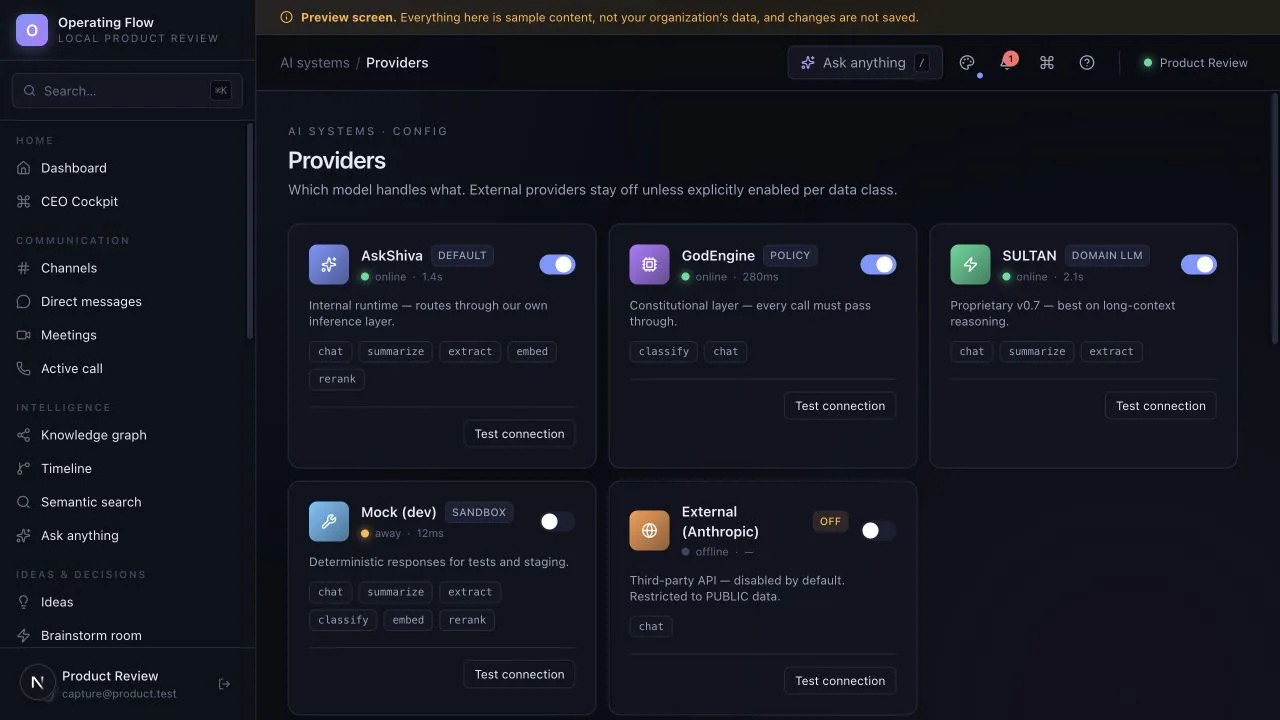
Sample AI unless a provider is configured.
Available for guided evaluation. Some AI and advanced workspace screens use sample behaviour; external AI providers need configuration. A demo is not proof of production readiness.
Provider routing and privacy rules exist. Availability and quality depend on configuration and separate validation.
What to verify before real use
A working interface is one piece of evidence.
The exact deployment, access controls, data handling, connected services and operating process need review for your use. A working local interface does not settle every live-use requirement.
Where the product would run for you, and who operates it.
Who can see which channels, records and projects.
Where information is stored, how long, and how it is removed.
Which external AI or other providers are configured, and under which rules.
Who supports the product and what responsibilities apply.
What we do not claim
If you see these anywhere, they are not from us.
- A fully autonomous company operating system
- Replacing every tool your team uses
- Production-proven AI accuracy
- Live push notifications to phones
- A verified live knowledge-map dashboard
- Customer counts, testimonials, logos, certifications, uptime, response times, prices or launch dates
A straightforward evaluation
- Ask for a demonstration with sample records.
- Follow one record from beginning to end.
- Ask where information is stored, who can access it and which actions are simulated.
- Review open issues before deciding what comes next.
Next step
Ask the difficult question first.
Evaluate one active project with your team. We can use that starting point to assess fit, show the relevant interface and make the remaining work clear.
Start with a question, not a commitment. Use sample or anonymised information.